MENATER Security operations
EnglishEN FrançaisFR
Documentation GitHub

Theme

Free · open source · runs on your own computer

An AI sorts your security alerts. You decide what happens.

Security tools raise hundreds of warnings a day, and most of them are nothing. MENATER reads them, tells you which ones matter, and asks you before it does anything.

Read the documentation
docker compose up -d --build
0things it does without asking you
1command to install it
100%stays on your computer
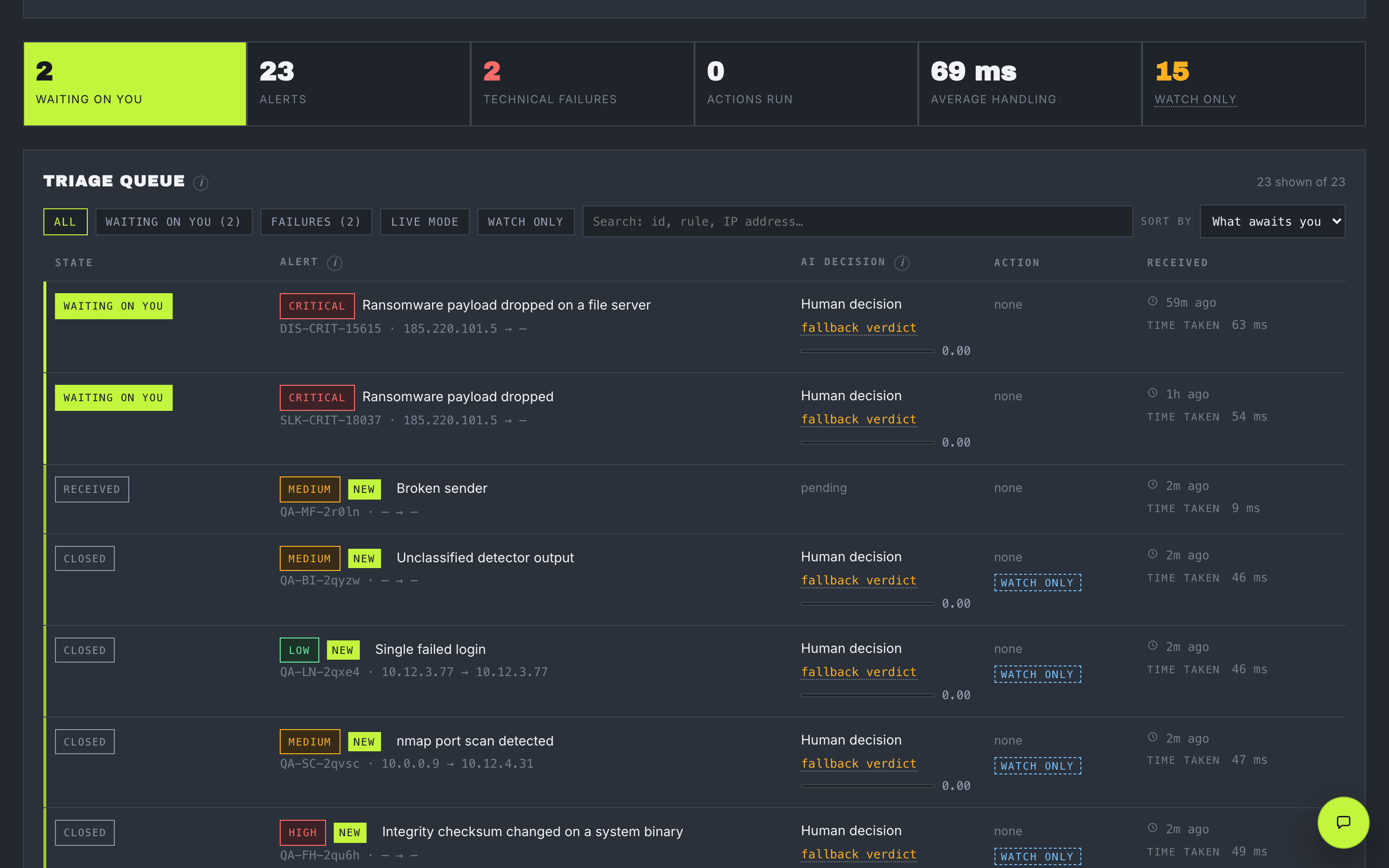
The MENATER triage queue: two alerts waiting on a human at the top, then closed cases, each row carrying severity, verdict, confidence and time taken.
The triage queue. Anything waiting on a human rises to the top and carries the accent — the one colour reserved for someone must act. Real screenshot: this install has no model key, hence the fallback verdict on every row.

An alert comes in. Five steps later, you decide.

Every alert goes through the same five steps, in the same order. The fourth one is you.

  1. Step 1 An alert arrives Something on your network looked wrong. Your security tools send it here.
  2. Step 2 Context is added Is this address known for attacks? Has this password leaked? MENATER asks around.
  3. Step 3 The AI gives its opinion What it thinks this is, how sure it is, and why. An opinion — not an order.
  4. Step 4 You You decide It asks you, on screen or in your chat app. Nothing happens until you answer.
  5. Step 5 It gets written down A record of what happened that nobody can quietly change afterwards.
  • You say yes That one thing happens. Nothing else.
  • You say no Nothing happens.
  • You do not answer Nothing happens. It goes to a person instead of expiring in silence.

On a fresh install, step 4 never even happens. MENATER only watches: it notes what it would have suggested, and does nothing at all, until you decide to switch that on.

Three things, on one screen.

Sorts your alerts

The urgent ones first, the rest out of your way. Open one and you see the whole story on a single page.

Checks your code

Point it at a folder or a GitHub project and it looks for the mistakes an attacker would use. Each one says what could happen, and how to fix it.

Answers a question

Paste an address, a website or an email and ask what is known about it. It always tells you how many sources actually replied.
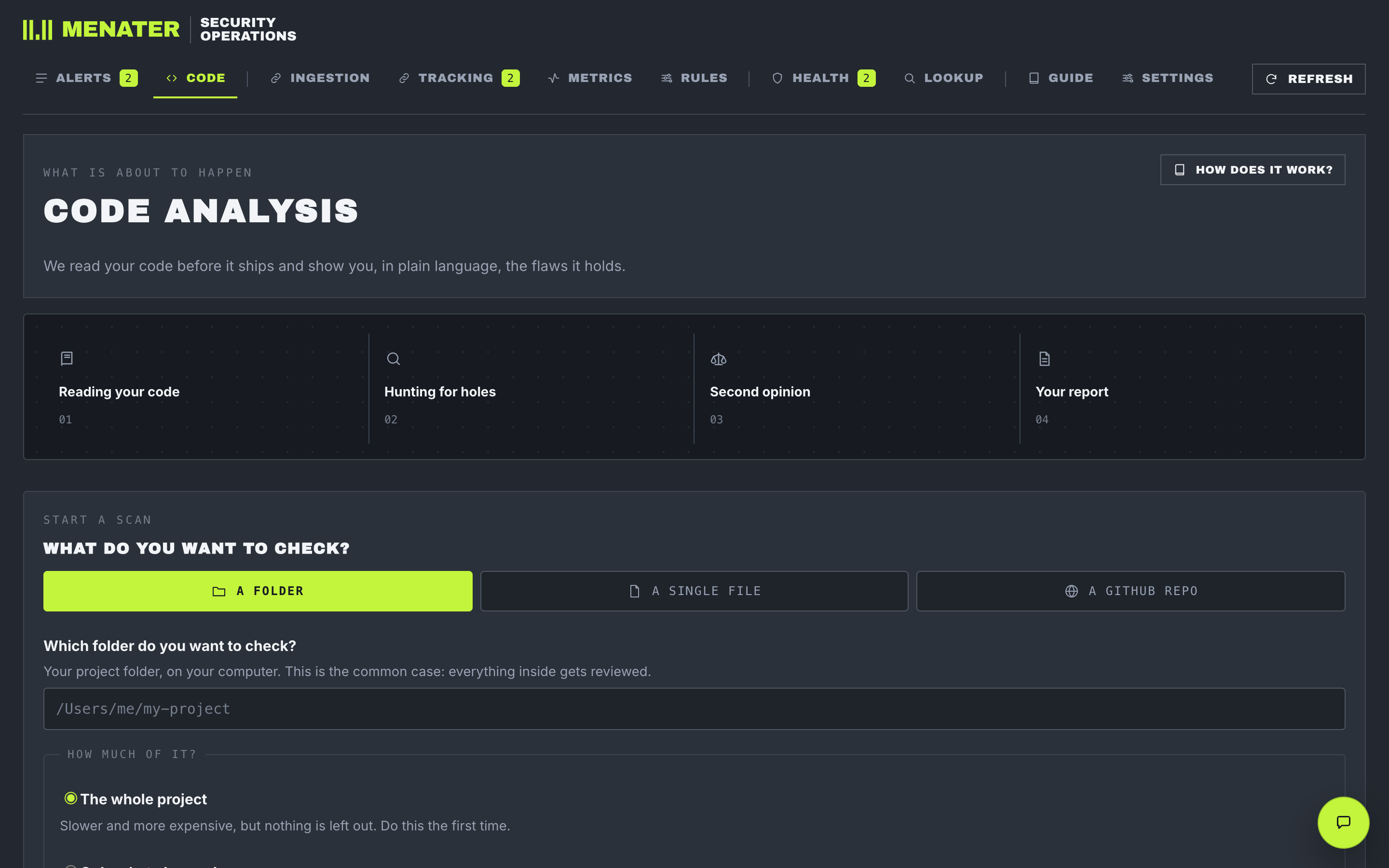
The Code tab: a four-stage strip reading “reading your code”, “hunting for holes”, “second opinion”, “your report”, then a target picker offering a folder, a single file or a GitHub repository, and a choice between the whole project and only what changed.
Code scanning. The four stages are named before anything runs, and the scope question says outright which choice costs more.

What it will never do.

  • It never acts on its own. There are exactly four things it can do, and every one of them needs your yes first.
  • It never guesses. When it does not know something, it says so. It never fills a blank with a plausible answer.
  • It never hides a problem. Something that broke is never shown as fine. A screen exists whose only job is to find that.
  • It never phones home. No account, no tracking. Your alerts go to the AI you picked, and nowhere else.

Two commands, and you have it.

You need Docker. Nothing else — no database to set up, no second machine.

# fill in the two passwords
cp .env.example .env

docker compose up -d --build

→ http://localhost:4400

It starts in three minutes, and it sorts nothing yet — you still have to tell it where your alerts come from and which AI to use. It shows you a checklist of what is missing. The documentation walks through all of it.